marp: true theme: default paginate: true
Govbot
Federated, open-source legislative data for everyone
Overview
The Problem Our Solultion What We Offer Features Setup + Core Functions
The Problem
Why don’t we pay attention to our representatives between elections?
Legislative data is hard to parse, track, and organize. Activists, concerned citizens, and the curious may not have the time, resources, or expertise to build out duplicative tech stacks.
The Problem (cont.)
Existing solutions may be limited by the willingness of organizations and companies to continue to run and host them - such as in the case of Google’s Civic Information API, which was shut down earlier this year.
What would a decentralized, open-source legislative data solution look like?
Our Solution
The Govbot team’s goal is to bridge this gap - building the framework for federated, open-source, non-profit legislative data.
Built as a Chi Hack Night Breakout Group, this project offers frameworks and tools built on top of OpenStates’ data on state and federal legislation.
What We Offer
The main Govbot dataset currently includes legislative updates from:
- the U.S. House & Senate
- Legislatures from all 50 states
- Legislatures from U.S. territories
Data is organized as .json files using the Project Open Data catalog format, scraped and appended regularly.
Features
- A decentralized, regularly updating, legislative data catalog
- AI-powered, topic-based tagging and summaries, customized using .yml
- SQL querying via DuckDB interface
- Example applications, like custom websites (see our demo WindyCivi site), and social media bots (see our BlueSky bot, made in collaboration with U.S. Representative Hoan Huynh)
Setup
You can download the setup script via one-line install, from our GitHub repository:
sh -c “$(curl -fsSL https://raw.githubusercontent.com/chihacknight/govbot/main/actions/govbot/scripts/install-nightly.sh)
Core Functions
Once installed, you can:
- Clone the entire dataset
- Clone specific items (state, session, or bill)
- Load metadata into a SQL-accessible DuckDB database
Project History
2022: socratic.center
The initial hypothesis: *What if citizens could easily track and understand the bills being voted on?*
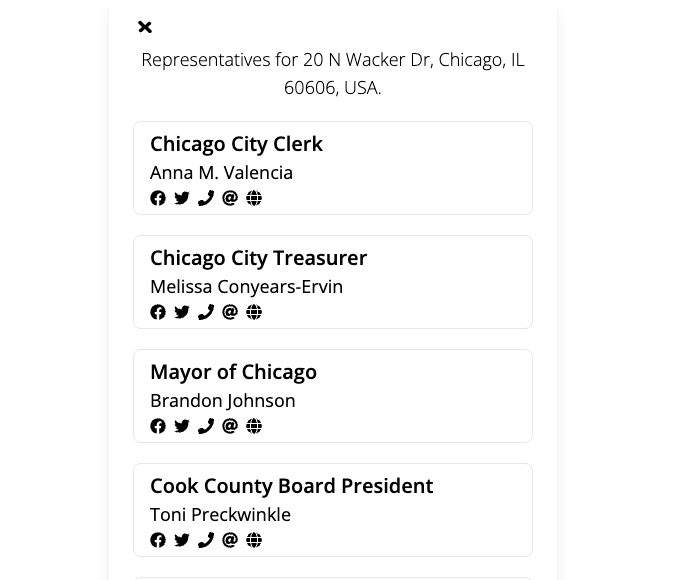
civi.social
This experiment helped us understand how citizens wanted to engage with civic data in their existing communities.

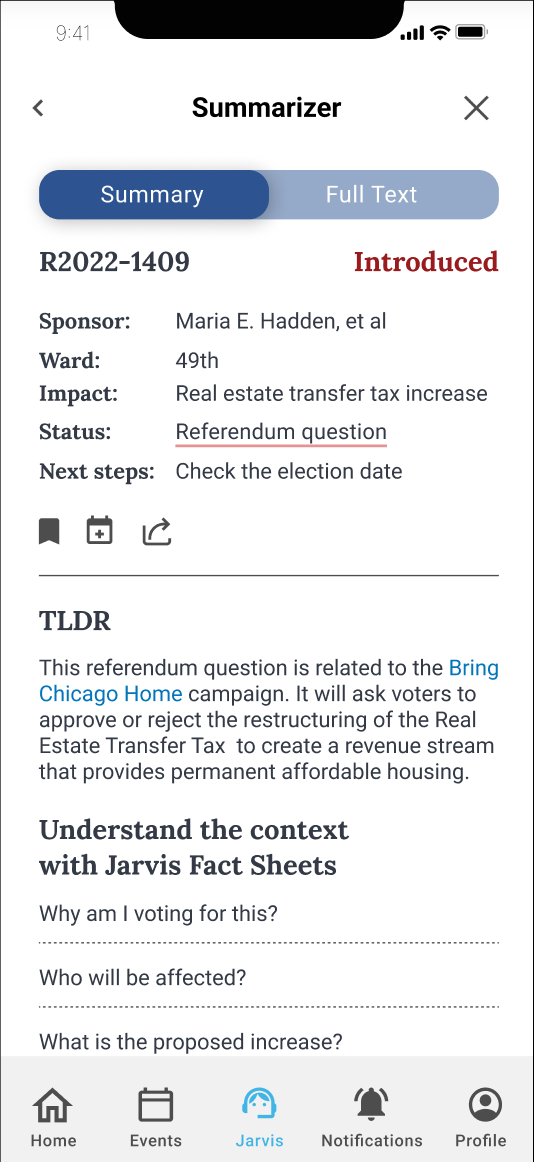
myChicago + Jarvis
The goal of Jarvis, our AI-powered assistant, would have been to help users understand legislation through:
- Simplified bill summaries
- Contextual information
- Guided engagement tools
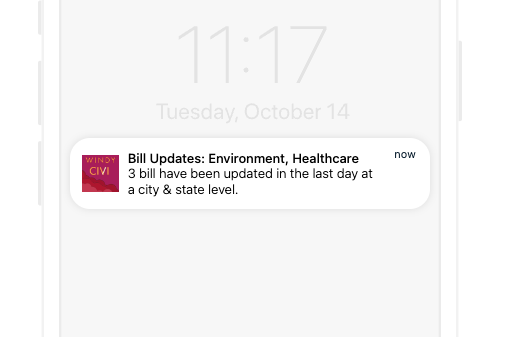
Windy Civi: Full Launch
The goal was to enable citizens to:
- Track bills by topic
- Receive personalized updates
- Connect directly with representatives
Rethinking Our Approach
While building these solutions, we began to ask a critical question:
What are the limitations of a centrally-managed platform?
- Can it scale to serve all communities?
- What happens if we stop maintaining it?
- How can others build on this work?
Our New Vision
Our vision has now pivoted to building the infrastructure itself:
- A decentralized legislative data data catalog
- Reusable frameworks for communities to build their own tools
- Sample applications demonstrating use cases
Our goal: Ensure that government accountability is accessible to all.
Live Demos
Basic Setup + Commands Querying via DuckDB Creating Social Media Bots
Basic Setup + Commands
Install via:
sh -c “$(curl -fsSL https://raw.githubusercontent.com/chihacknight/govbot/main/actions/govbot/scripts/install-nightly.sh)
Once installed, you can download and set up the data using the following commands
govbot # to see help
govbot clone # to show available datasets
govbot clone {{locale}} {{locale}} # download specific items
govbot delete {{locale}} # delete specific items
govbot delete all # delete everything
govbot load # load bill metadata into DuckDB
Querying with DuckDB
First, set up DuckDB, which creates a simulated database from the .json log files:
govbot load #Load all data into a database
govbot load –database my-bills.duckdb #Specify a custom database file
govbot load –memory-limit 32GB –threads 8 #With memory limit and thread settings

duckdb –ui govbot.duckdb #Open in DuckDB UI (opens in browser)
Once the DuckDB database is created, you can query as normal
– Load JSON extension
INSTALL json;
LOAD json;
– Query all bill metadata
SELECT *
FROM read_json_auto(’~/govbot_data/repos/**/bills/*/metadata.json’)
LIMIT 10;
Creating Social Media Bots
Technical Details
Our Open Civic Data Proposal
Democratizing government data
- What does it mean to democratize government data?
- Today: legislation (with room to expand to courts, agencies, and more)
- To understand the solution, it helps to first understand the problem
The problem
Legislative data is commonly distributed through APIs or large database dumps. These approaches work well for transactional access, but they introduce real limitations when the goal is long-term analysis and accountability.
They make it harder to:
- Perform bulk or historical analysis
- Track changes over time
- Analyze data without running a database server
They also introduce fragility:
- APIs change or disappear
- Long-term access and verification become difficult
Why this matters
- Civic trust
- Research
- Accountability
- Anyone can verify, not just institutions
- A shared source of truth without interpretation baked in
What we built (and why Git)
- File-based structure
- Bills, events, logs
- Deterministic paths to find things
- Built on Git for history, distribution, cheap branching, and broad accessibility
- Aligned with Open States data and Open Civic Data (OCD) identifiers
- Formalized through an Open Civic Data proposal
This design treats the filesystem as the primary interface for civic data.
The OCD proposal (why this matters upstream)
- Makes the model reusable beyond Windy Civi
- Provides shared vocabulary and structure
- Enables other projects to adopt or adapt the approach
Technical challenges and triumphs
- Making transformations deterministic so Git diffs remain meaningful
- Interpreting and triaging state-by-state scraper errors
- Passing data cleanly between CI steps (artifacts, environment variables, Docker parity)
- Designing self-contained log entries that remain analyzable outside their folder context
- Building a “last seen” mechanism when upstream sources return full snapshots
- Identifying hard limits: PDF redlines and crossouts remain an open problem
A Dive Into Local AI Tagging
Use two models for two very different roles
- Smart LLM (ChatGPT / Claude / Cursor)
- Human-in-the-loop
- Used during development
- Produces tag configuration
- Small embedding model
- Fully automated
- Used in production
- Categorizes every update
The smart LLM helps write the rules The small model runs them
Step 1: Tag Authoring (Developer Workflow)
A developer sits down with:
- Sample legislative updates
- Court rulings
- Regulatory notices
Using ChatGPT / Claude / Cursor, they prompt:
“Create a tag config for legislative bill introductions. Include examples, negative examples, and keywords.”
The output is reviewed, edited, and committed like code.
Important Clarification
The “smart” LLM is not part of production.
It is used the same way you’d use:
- A code editor
- A linter
- A schema generator
Think of ChatGPT / Claude / Cursor as a tag authoring tool.
What the Smart LLM Actually Does
The smart LLM is used interactively by a developer to:
- Define new tags
- Refine descriptions
- Generate examples and edge cases
- Identify negative examples
- Propose include / exclude keywords
It replaces manual taxonomy writing — not runtime logic.
What’s next for the project
- Building relationships with activists and journalists
- Creating + designing customizable tagging templates + a system to share them
- Incorporating Executive Orders, judicial opinions, and other relevant non-legislative documents
- Exploring use cases for the data, such as automated content pipelines
- Add donation data for analysis of legislative priorities and campaign promises
Special thanks to the following contributors:
Sartaj Chowdhury Tamara Dowis Edwin Chalas Cuevas Andrew Dauphinais Emme Kari Douglass Marissa Heffler Sartaj Chowdhury Zach Schoneman Brian Burns
Thank You!
- Chi Hack Night
- Open States
- Open Civic Data community
Building government accountability tools accessible to all
Appendix
Contributing & Testing FAQs
Contributing & Testing
Prerequisites
Knowledge of Rust and the just task runner required.
- Rust & Cargo: Install the Rust Toolchain
- Just: Install the task runner:
cargo install just
Development Workflow
Use just govbot ... as your CLI “dev” environment.
Useful Commands:
just- See all available tasksjust test- Run all testsjust review- Review snapshot test changesjust mocks [LOCALES...]- Update mock data for testing
Dataset Status Key
- 🆕 The locale’s data received updates since your last cloning
- ✅ Your data is up-to-date with the most current version
- 🔄 The data is currently being updated
- ❌ The data is not currently accessible
FAQs: Repositories
Can I See The Repo?
- Main repo: windy-civi/windy-civi
- Toolkit repo: chihacknight/govbot
FAQs: Data Structure
How Is The Data Structured?
Find the file format structure and .json schema in the readme.md: DATA_STRUCTURES.md
FAQs: Cloning Data
How Do I Clone This Data?
Each locale is scraped using a GitHub Actions template explained here: README_TEMPLATE.md
To manage multiple pipelines or locales, see our pipeline manager documentation
Stay Connected
How Can I Stay Updated, Or Get In Touch?
- Follow our work at Chi Hack Night
- Check commits and updates on GitHub
- Visit our Docs page
- Join the Chi Hack Night Slack